اعثر على أي ملف في جهازك
باسمه أو بالكلمات التي بداخله

Find any file on your PC
by its name or the words inside it

DocSeeker برنامج مجاني لنظام Windows يبحث داخل ملفات Word وPowerPoint وExcel وPDF، وداخل الملفات المضغوطة zip وrar و7z، مع بحث عربي ذكي، ويعمل دون إنترنت دون أن تغادر ملفاتك جهازك.

DocSeeker is a free Windows program that searches inside your Word, PowerPoint, Excel and PDF files, and inside .zip, .rar and .7z archives, with smart Arabic search. It works offline, and your files never leave your PC.


احصل عليه من Microsoft Get it from Microsoft
لنظام Windows 10 و11 · واجهة عربية وإنجليزية · كل الإصدارات
For Windows 10 and 11 · Arabic and English interface · All versions
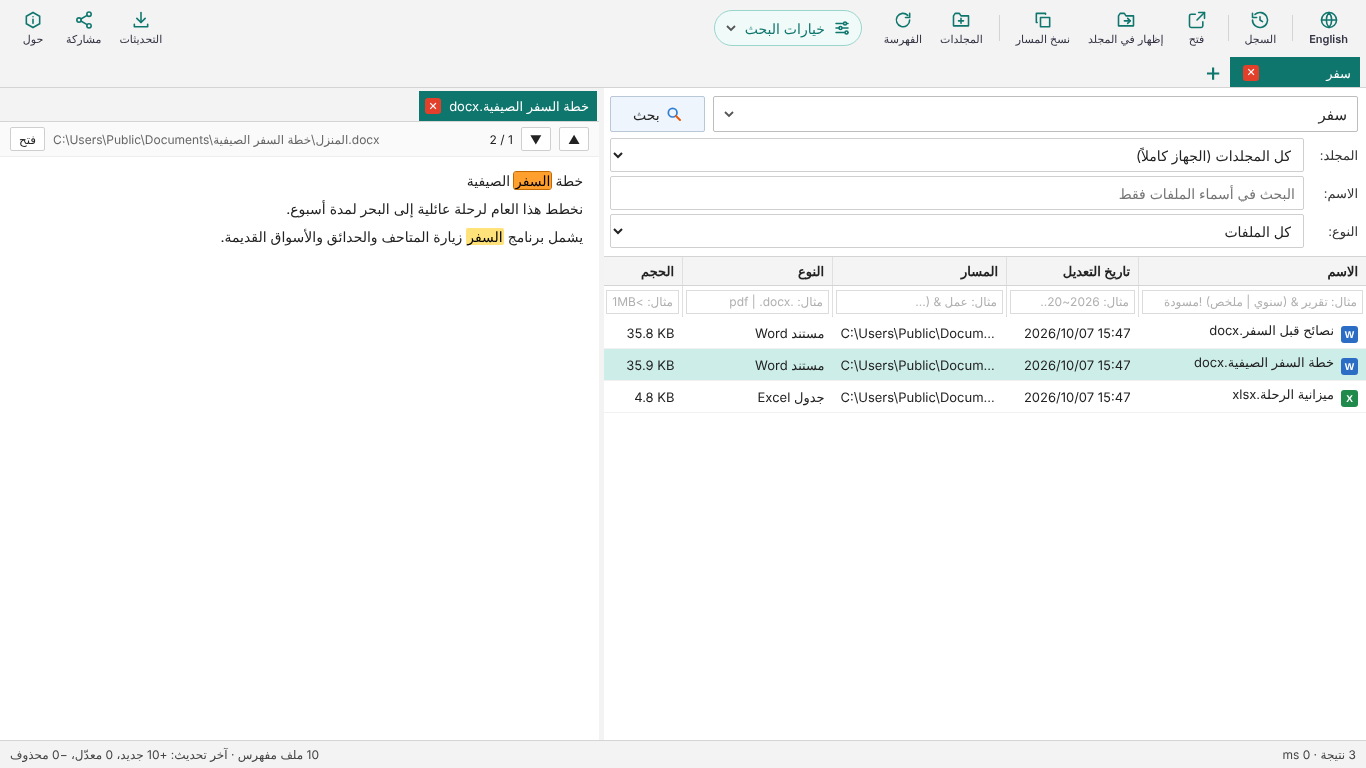
DocSeeker

لماذا DocSeeker؟

Why DocSeeker?

يبحث داخل الملفات

Searches inside files

Word وPowerPoint وExcel وPDF والملفات النصية، وليس الأسماء فقط. تظهر النتائج أثناء الكتابة.

Word, PowerPoint, Excel, PDF and text files, not just file names. Results appear as you type.

بحث عربي ذكي

Smart Arabic search

يتجاهل التشكيل واختلاف أ/ا/إ وة/ه وى/ي و«ال». البحث عن «عامل» يجد «العاملين».

Ignores diacritics and أ/ا/إ, ة/ه, ى/ي and «ال» differences. Searching عامل also finds العاملين.

خصوصية تامة

Fully private

يعمل دون إنترنت، ولا يرفع أي شيء، ولا حسابات ولا إعلانات. ملفات OneDrive السحابية لا تُنزَّل.

Works offline, uploads nothing, no accounts, no ads. Cloud-only OneDrive files are never downloaded.

سريع وسهل

Fast and simple

ابحث في الجهاز كاملاً أو في مجلدات تختارها، وشاهد الكلمات مظللة، وافتح الملف أو شاركه بنقرة.

Search the whole PC or chosen folders, see matches highlighted, and open or share a file in one click.

داخل الملفات المضغوطة

Inside compressed files

يبحث في أسماء ومحتوى الملفات الموجودة داخل zip وrar و7z، حتى المحمية بكلمة مرور إذا حفظتها.

Searches the names and contents of files inside .zip, .rar and .7z, even password-protected ones once you save the password.

ملفات Office القديمة

Old Office files

يقرأ محتوى ملفات .doc و.xls و.ppt القديمة (97-2003) إلى جانب الصيغ الحديثة.

Reads the contents of old .doc, .xls and .ppt files (Office 97-2003) as well as the modern formats.

طريقة التثبيت

How to install

  1. الطريقة الأسهل: اضغط زر احصل عليه من Microsoft أعلاه ثم تثبيت في متجر Microsoft. يُثبَّت البرنامج دون أي رسائل تحذير ويتحدث تلقائياً.

أو التثبيت من الملف المضغوط:

  1. اضغط نزّل ملف التثبيت مباشرة أعلاه، فيُحفظ الملف المضغوط في مجلد «التنزيلات».
  2. اضغط على الملف بالزر الأيمن واختر استخراج الكل (Extract All).
  3. افتح المجلد الناتج وانقر نقراً مزدوجاً على DocSeeker-Setup.exe.
  4. إذا ظهرت نافذة زرقاء بعنوان «Windows protected your PC» فاضغط More info ثم Run anyway.
  5. اضغط Next ثم Install ثم Finish. اختر المجلدات أو «كل الأقراص» وابدأ البحث.
  1. Easiest: click Get it from Microsoft above, then Install in the Microsoft Store. It installs with no warnings and updates automatically.

Or install from the zip file:

  1. Click download the installer directly above. The zip file is saved to your Downloads folder.
  2. Right-click the file and choose Extract All.
  3. Open the extracted folder and double-click DocSeeker-Setup.exe.
  4. If a blue window says "Windows protected your PC", click More info, then Run anyway.
  5. Click Next, Install, then Finish. Choose your folders or "All drives" and start searching.
في طريقة الملف المضغوط فقط: تظهر النافذة الزرقاء لأي برنامج جديد غير مسجّل لدى Microsoft بعد، ولا تعني وجود خطر. البرنامج لا يحتاج إلى صلاحيات المسؤول ويُثبَّت لحسابك فقط.
Zip file only: the blue window appears for any new program not yet registered with Microsoft; it does not mean anything is wrong. DocSeeker needs no administrator rights and installs for your account only.

خصوصيتك

Your privacy

  • يُحفظ الفهرس والإعدادات وسجل البحث على جهازك فقط.
  • لا يُرسل أي ملف أو اسم ملف أو كلمة بحث إلى أي جهة، ولا يوجد تتبع ولا إعلانات.
  • الاتصال الوحيد بالإنترنت هو البحث عن إصدار جديد، وفتح واتساب أو تيليجرام أو Gmail عندما تختار المشاركة بنفسك.
  • The index, settings and search history stay on your computer only.
  • No file, file name or search word is ever sent anywhere. No tracking, no ads.
  • The only internet use is checking for a new version, and opening WhatsApp, Telegram or Gmail when you choose to share.